SMS Messaging Terms & Consent
Effective date: April 9, 2026 · Last updated: October 6, 2026
1. Program Overview
ScheduleFriend is an online scheduling platform for tennis coaches, operated by Alpaca Kit Technologies Limited at schedulefriend.com. Alpaca Kit Technologies Limited is the sole sender and operator of all SMS text messages described in this program under the ScheduleFriend brand. No third-party businesses send messages through our number.
ScheduleFriend offers an optional SMS text messaging program to keep you informed about your tennis lesson bookings. When you opt in, you may receive the following types of automated text messages from ScheduleFriend:
- Booking confirmations — sent when a lesson is booked
- Appointment reminders — sent 24 hours and 2 hours before your scheduled lesson
- Cancellation & rescheduling notifications — sent when a booking is cancelled or moved
- Attendance check — if your coach asks students to confirm, a text the day before asking you to reply YES to confirm or NO to cancel
- Coach alerts(coaches only) — when a student can't make a lesson or hasn't confirmed it
Every message starts with "ScheduleFriend:" and is written by ScheduleFriend — coaches cannot send their own text messages through this program. We do not send marketing or promotional text messages.
2. How You Opt In (Consent)
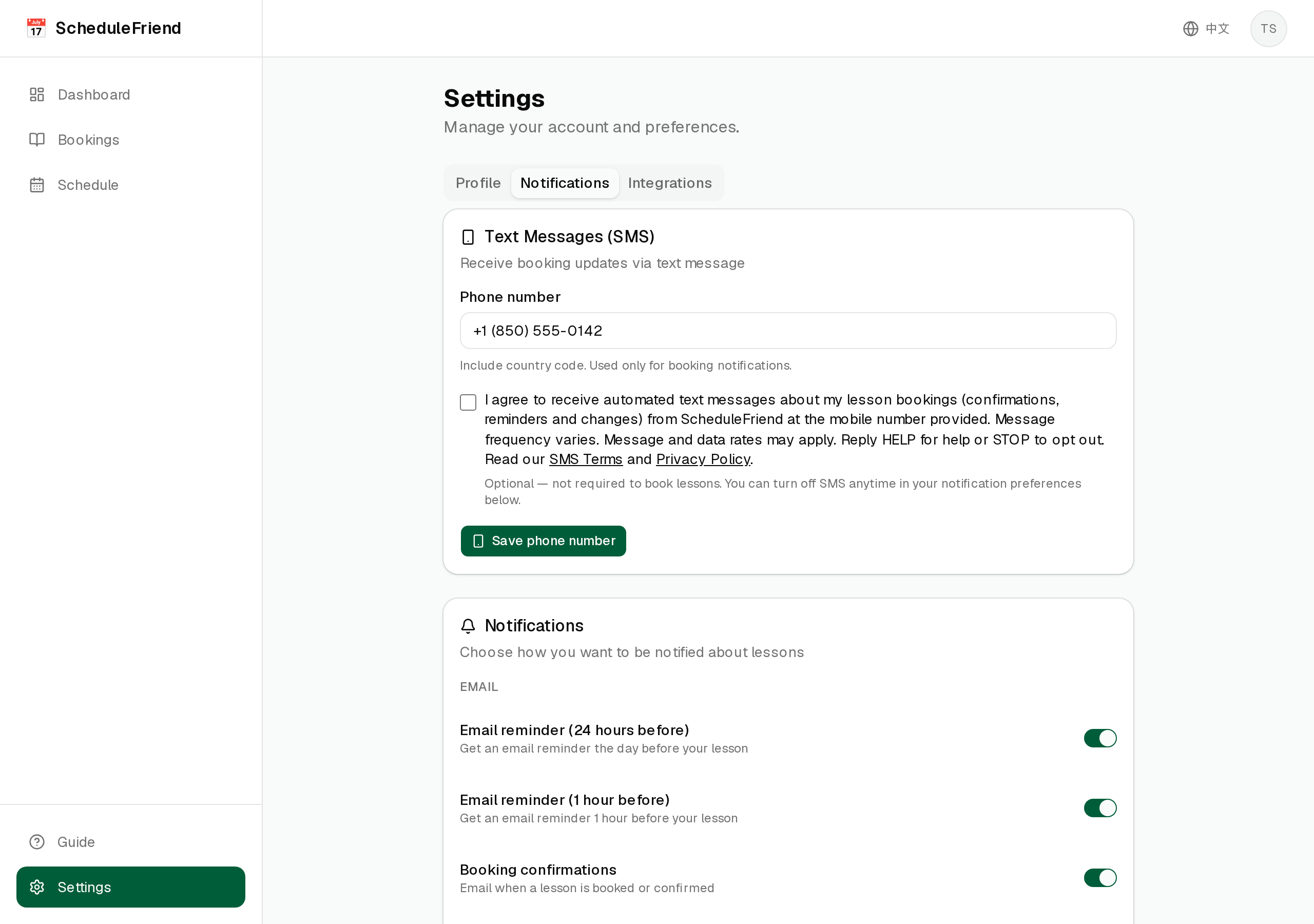
You opt in to receive SMS text messages from ScheduleFriend in your account settings at schedulefriend.com/settings (Settings → Notifications → Text Messages). The opt-in process requires two explicit actions:
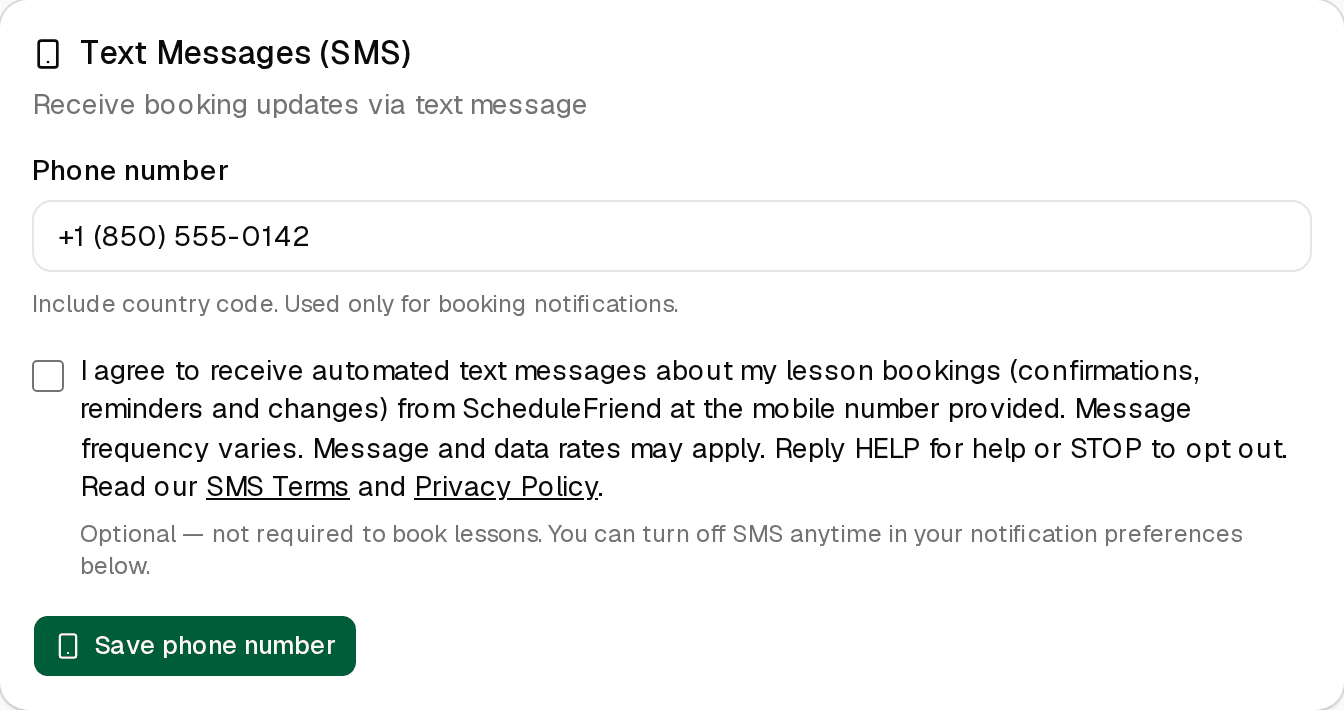
- Enter your mobile phone number (with country code)
- Check the SMS consent checkbox (shown below) and save
The consent checkbox is unchecked by default — you must actively select it to opt in. No SMS text messages will be sent until both your phone number is provided and the checkbox is checked. Right after you opt in, we send one text confirming your subscription, with HELP and STOP instructions.
The checkbox reads:
"I agree to receive automated text messages about my lesson bookings (confirmations, reminders and changes) from ScheduleFriend at the mobile number provided. Message frequency varies. Message and data rates may apply. Reply HELP for help or STOP to opt out. Read our SMS Terms and Privacy Policy."
In the app, "SMS Terms" links to this page and "Privacy Policy" links to our Privacy Policy.
3. Consent Is Not Required
Consent to receive SMS messages is not a condition of booking, purchasing, or using any ScheduleFriend service. You may book lessons and use the platform without opting in to SMS notifications.
4. Message Frequency & Rates
Message frequency varies based on your booking activity. You will typically receive up to 4 messages per lesson: a booking confirmation, a reminder (or attendance check) the day before, a reminder 2 hours before, and a cancellation or reschedule notice if applicable.
Message and data rates may apply. Check with your mobile carrier for details about your messaging plan.
5. How to Opt Out
You can stop receiving SMS messages at any time by using any of these methods:
- Reply STOP to any SMS message you receive from ScheduleFriend
- Disable SMS notifications in your account settings under Notification Preferences
After opting out, you will receive a one-time confirmation message acknowledging your request. You will not receive any further SMS messages unless you opt in again.
Other supported opt-out keywords: STOPALL, UNSUBSCRIBE, CANCEL, END, QUIT.
6. Help & Support
For help with SMS messaging, you can:
- Reply HELP to any SMS message for assistance
- Email us at helloalpacakit@gmail.com
7. Mobile Data & Privacy
When you opt in to SMS notifications, we collect your mobile phone number and a record of your consent (including date, time, and method). This information is used solely to send you appointment-related text messages.
We will not share your mobile phone number, SMS opt-in data, or consent information with any third parties or affiliates for marketing or promotional purposes. All categories above exclude text messaging originator opt-in data and consent; this information will not be shared with any third parties, both internal and external.
For full details on how we handle your data, see our Privacy Policy.
8. Supported Carriers
SMS messages are sent via standard text messaging protocols and should work with all major US mobile carriers. Wireless carriers are not liable for delayed or undelivered messages.
9. Changes to These Terms
We may update these SMS terms from time to time. Changes will be posted on this page with an updated "Last updated" date. Your continued participation in the SMS program after changes constitutes acceptance of the updated terms.
10. Contact Us
If you have questions about the ScheduleFriend SMS messaging program operated by Alpaca Kit Technologies Limited, please contact us at helloalpacakit@gmail.com.
Alpaca Kit Technologies Limited
Unit 1603, 16/F, The L. Plaza, 367–375 Queen's Road Central, Sheung Wan, Hong Kong
Quick Summary
- Program: ScheduleFriend SMS text message notifications
- Sender: ScheduleFriend (schedulefriend.com)
- Message types:Booking confirmations, 24-hour & 2-hour reminders, cancellation & reschedule notices, attendance checks
- Frequency: Varies (typically up to 4 per lesson)
- Cost: Message and data rates may apply
- Opt out: Reply STOP to any message
- Help: Reply HELP or email helloalpacakit@gmail.com
- Consent: Not required to use ScheduleFriend